Purpose-built custody software for BSL-3 and BSL-4 laboratories

Select Agent Inventory Management System (SAI) is a modern web app for laboratories that must comply with federal select agent regulations. Track samples and vials, approve custody transfers, and record verified destruction — installed on your own servers, so inventory data never leaves your network.

Request a demo

A private screen-share walkthrough, scheduled around your team.

In use at high-containment laboratories.

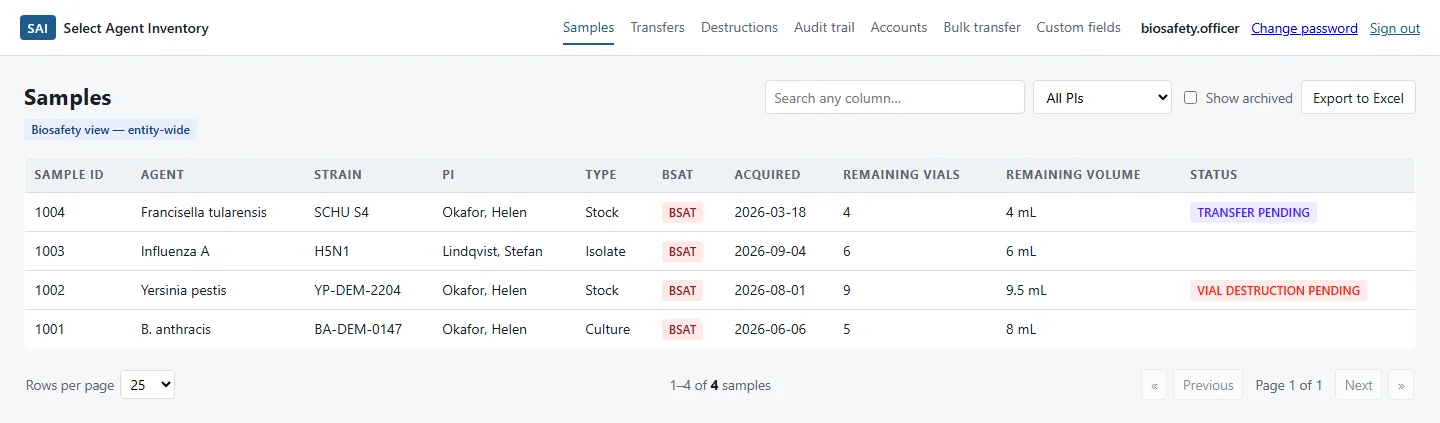
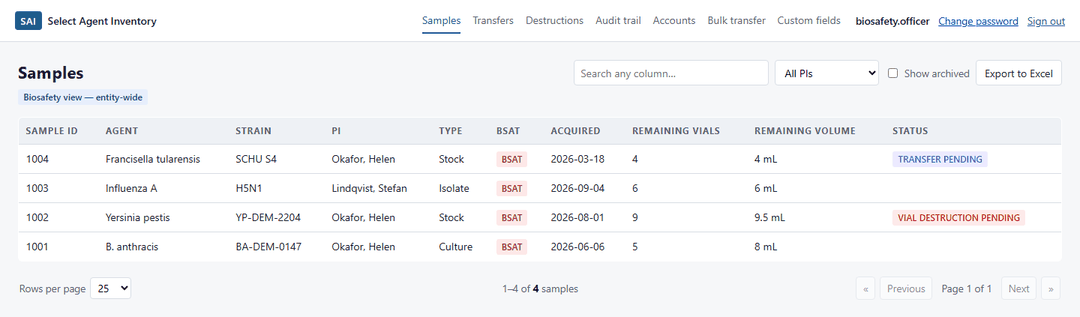
SAI Samples list in the entity-wide biosafety view, showing four demo samples with agent, strain, principal investigator, type, acquisition date, remaining vials and volume. Sample 1004 is marked Transfer pending and sample 1002 is marked Vial destruction pending.
Samples list, biosafety view. Demo data.
View larger image: Samples list, biosafety view. Demo data.

Built for select-agent custody, not retrofitted later

Spreadsheets cannot enforce who may approve a transfer or who may destroy material. Generic laboratory systems usually need heavy customization to do so. Older inventory databases often grew a thicket of workarounds, including scripts that could bypass permission checks, and some stored passwords in plain text.

SAI is purpose-built for regulated biological material: samples, vial sets, custody transfers, and destructions. The security, audit, and inventory rules live in the product itself. It is a browser-based web application designed to replace legacy FileMaker select-agent inventory systems.

How custody is recorded

Every workflow below is built into SAI. The point is not a longer sample list. It is a complete, tamper-resistant record of what happened to the material, and who was allowed to do it.

Inventory you can trust

Automatic counts, full lineage

You always know how many vials remain, and you can trace a set after it is split, merged, transferred, or destroyed.

  • Sample and vial inventory with automatic remaining-vial counts and status tracking.
  • Split or merge vial sets and keep full lineage, including parent and transferred-from history. A partial transfer or destruction splits the set automatically.
  • Move storage locations in bulk when material is relocated.
  • Export the sample list to Excel.
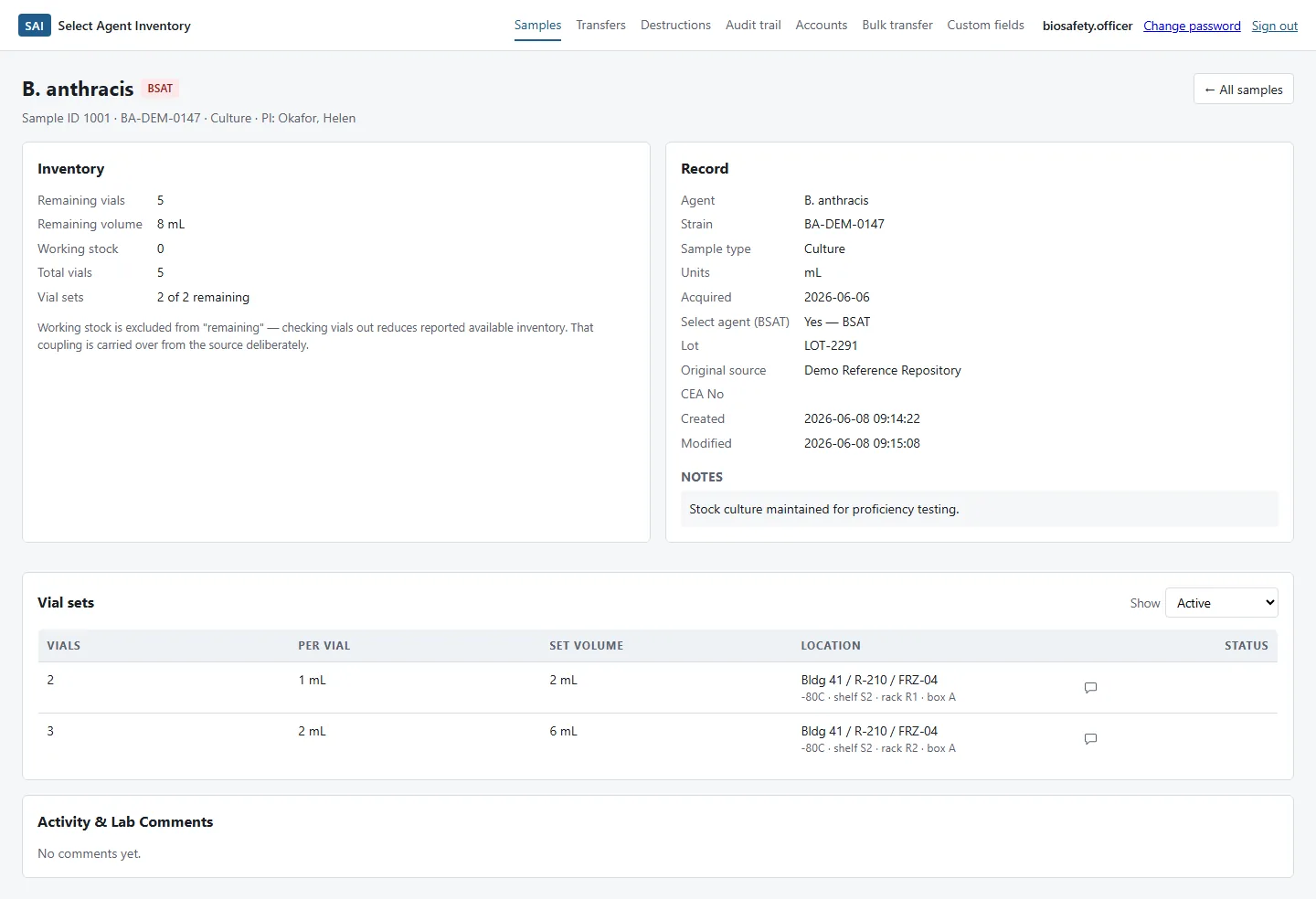
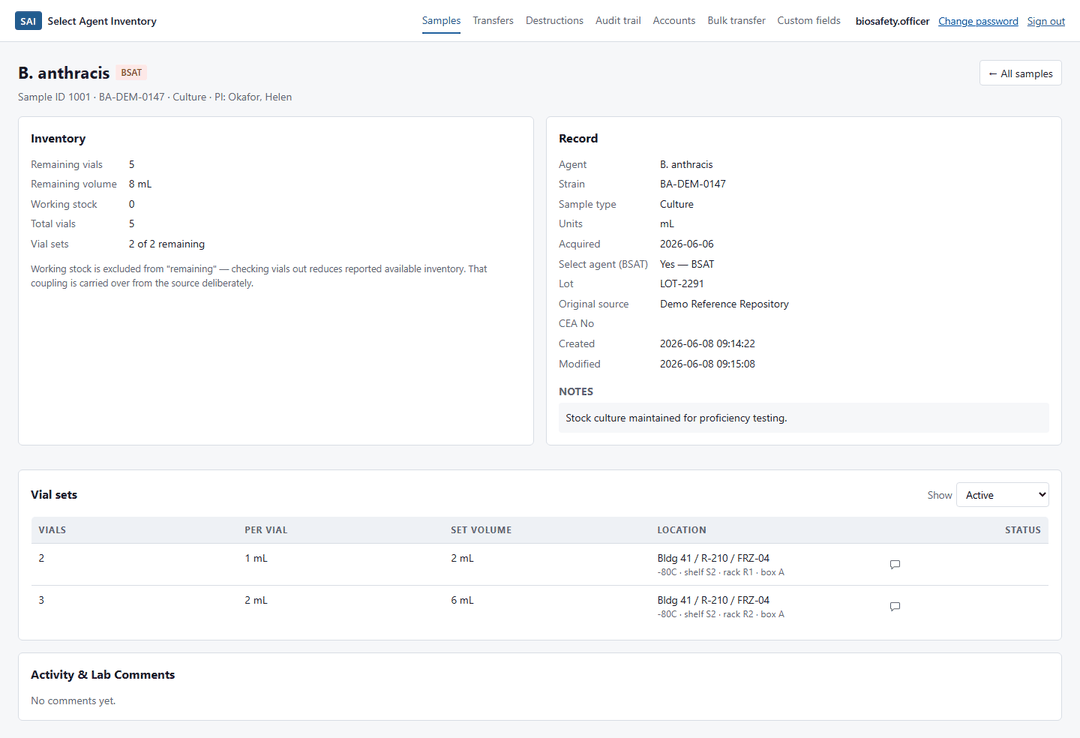
SAI sample detail page for demo sample 1001, showing inventory totals, the sample record, and two vial sets with their storage locations.
Sample record with inventory totals and vial sets. Demo data.
View larger image: Sample record with inventory totals and vial sets. Demo data.

Transfers with approval by transfer type

No transfer moves without the right approvals

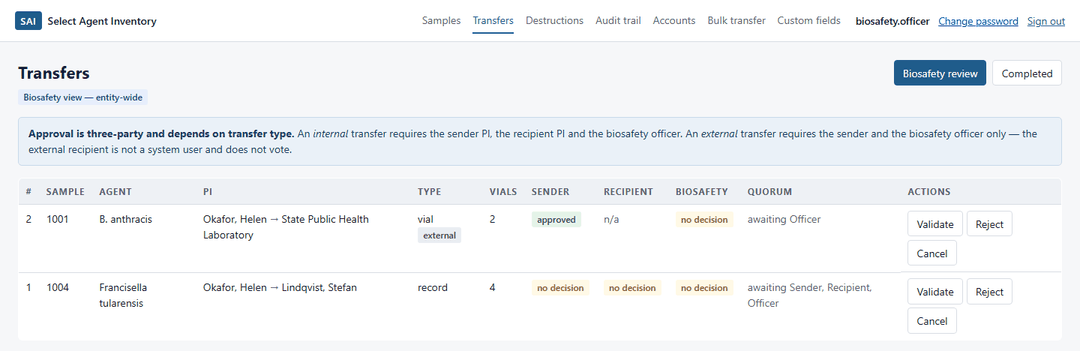
Custody cannot quietly change hands. The required approvals depend on the transfer type, and only the biosafety officer can validate or execute the transfer.

  • Internal transfers are approved by the sender PI, the recipient PI, and the biosafety officer.
  • External transfers are approved by the sender and the biosafety officer only. There is no recipient PI, because the external recipient is not a system user and does not approve.
  • Only the biosafety officer can validate or execute a transfer.
  • Material pending transfer is locked from edits until the transfer is complete or the request is no longer in progress.
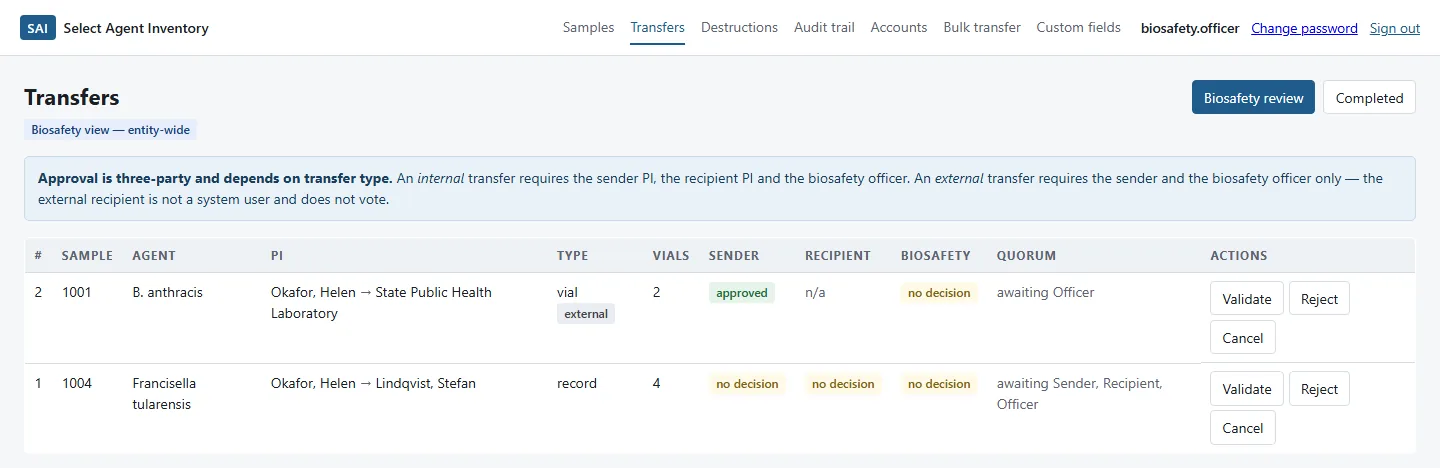
SAI Transfers queue with two demo requests, one external and one internal, showing sender, recipient and biosafety decisions and which approvals are still awaited.
Transfer queue with approval status by party. Demo data.
View larger image: Transfer queue with approval status by party. Demo data.

Destruction with separation of duties

Destruction is never a one-person action

Two different people must be involved, the method is required, and you get a printed record that references the federal recordkeeping rule.

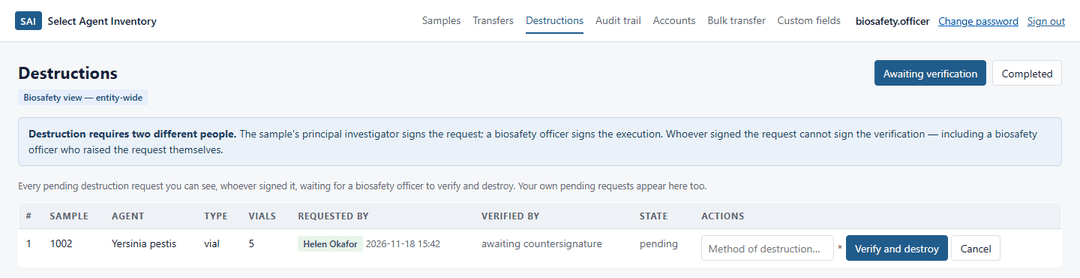
  • The PI or a designee requests destruction. A different person — a biosafety officer — executes it. The same person can never do both.
  • The method of destruction is required.
  • The system prints a destruction certificate that references 42 CFR 73.17 recordkeeping.
  • Material pending destruction, or already archived, cannot be edited.
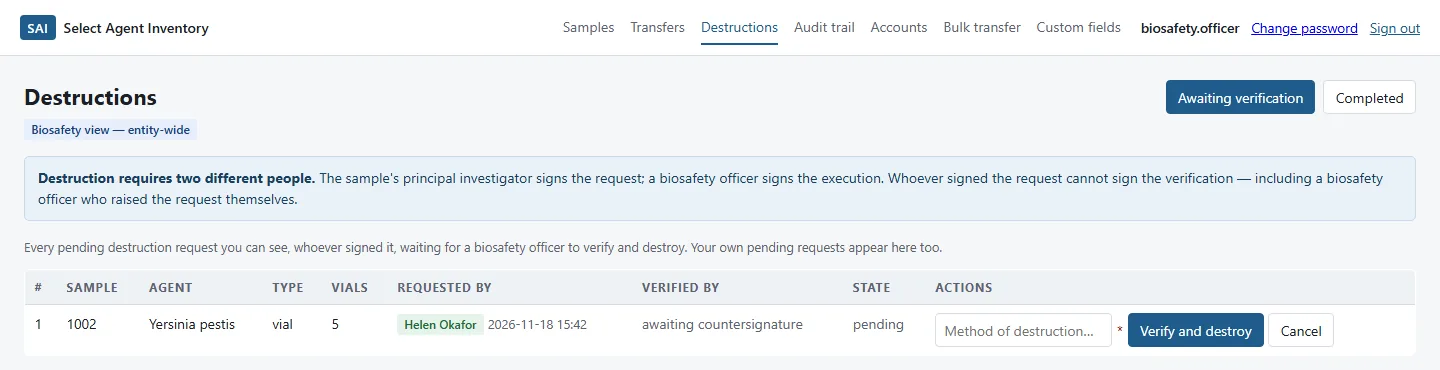
SAI Destructions queue with one pending demo request awaiting countersignature, a required method of destruction field, and a Verify and destroy button.
Destruction request awaiting biosafety verification. Demo data.
View larger image: Destruction request awaiting biosafety verification. Demo data.

An audit trail you can export, not alter

Oversight without changing the record

When you need a record of what changed, it is already there — including changes made outside the usual screens.

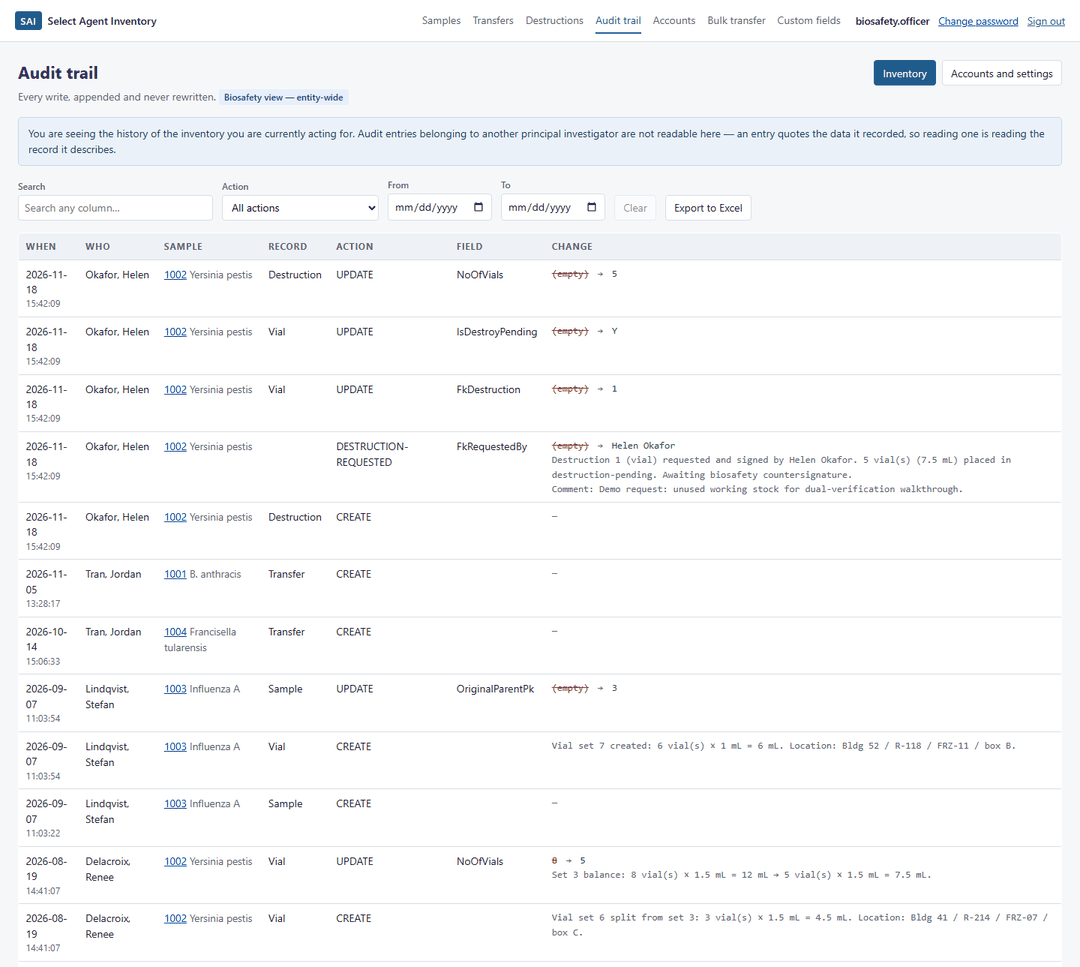
  • Every change to every record, including accounts, is captured automatically, even when made through an import or a script.
  • The audit trail is append-only. Edits and deletions are blocked. The only writable field is an explanation note.
  • Export the audit trail to Excel.
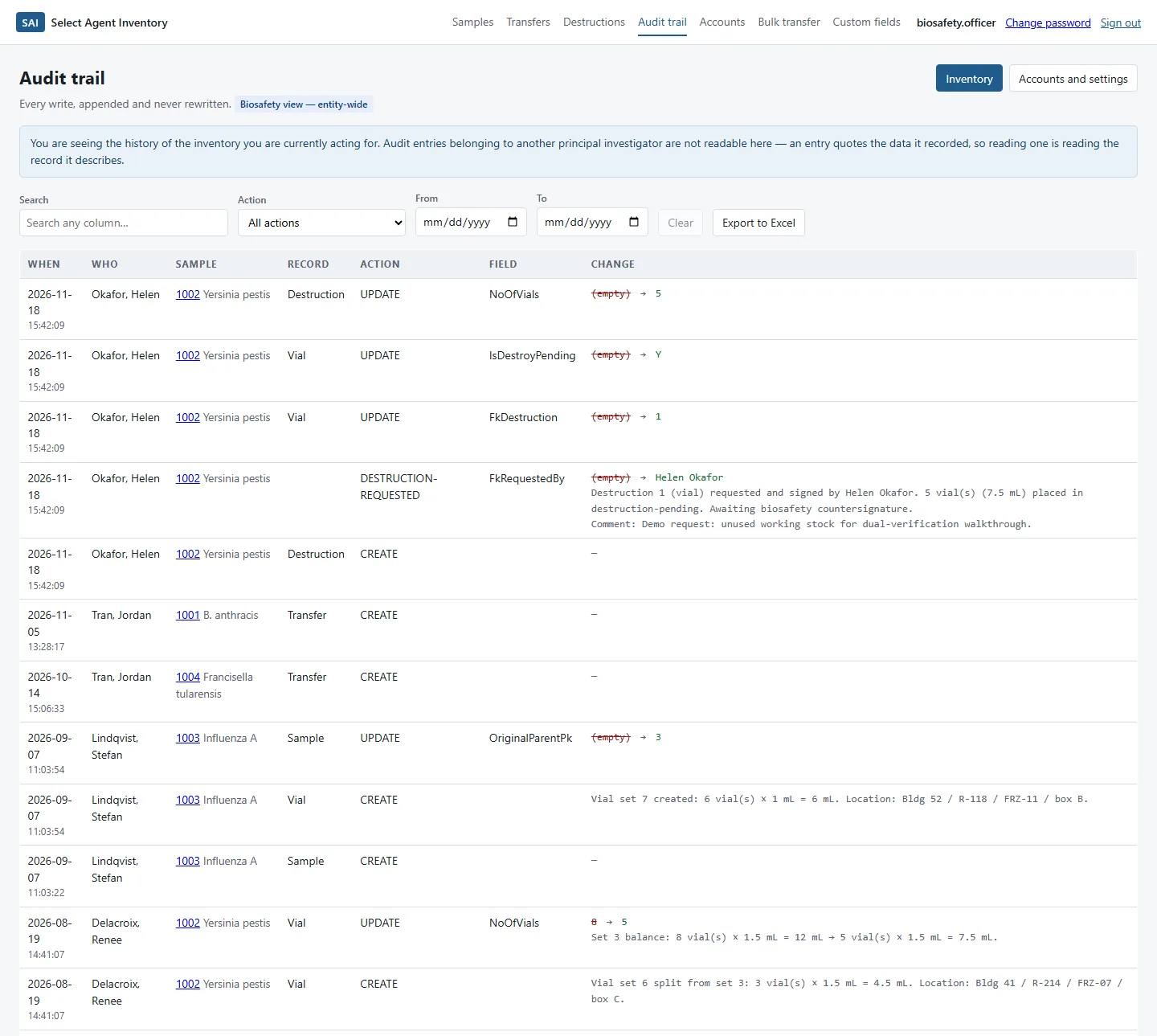
SAI Audit trail table of demo inventory writes, listing when, who, sample, record, action, field and change for sample, vial, transfer and destruction records.
Audit trail of sample, vial, transfer, and destruction changes, partial view. Demo data.
View larger image: Audit trail of sample, vial, transfer, and destruction changes, partial view. Demo data.

Security that belongs in a high-containment lab

Access follows the work. Researchers and PIs, biosafety officers, read-only division chiefs and reviewers, and administrators each have a defined role.

Users see only their own division and PI's material. That rule is enforced in the database, not only by what the screens hide. Records outside a user's scope return as not found, so the system never confirms that they exist.

Every change is written to the append-only audit trail described above. Sign-in can use Windows Active Directory or local accounts, chosen by configuration. Passwords are hashed. Inactive accounts are refused at sign-in.

SAI is installed on your laboratory's own Windows and IIS servers. Inventory data stays inside your network. A per-site extension SDK is available when a laboratory needs its own customizations.

SAI is designed to help laboratories maintain complete, controlled records of inventory, transfers, and destructions under the Federal Select Agent Program (42 CFR 73). The destruction certificate references 42 CFR 73.17 recordkeeping.

Built for registered high-containment laboratories

SAI is for BSL-3 and BSL-4 laboratories that must comply with the Federal Select Agent Program. It is a fit when a lab is still tracking select agents and toxins in a legacy FileMaker system, in spreadsheets, or in a generic LIMS that was not built for select-agent custody.

Biosafety officers and Responsible Officials
Complete, controlled records of inventory, transfers, and destructions. Only the biosafety officer validates or executes transfers, and only a biosafety officer executes destructions.
Principal investigators
Clear workflows for their own material. They can request a destruction, but they cannot also execute it. They do not see another PI's inventory.
Lab managers
Accurate vial counts, lineage, bulk storage moves, and Excel exports, in a browser, without a desktop database client.
Division chiefs and reviewers
Read-only visibility limited to their division, with an unaltered audit trail.
IT and security teams
On-premises installation on Windows and IIS, optional Active Directory sign-in, hashed passwords, role-based access, and database-level row-level security.

Installed on your servers, used in a browser

Laboratories install SAI on their own Windows and IIS servers. This is not a cloud-hosted product. Inventory data does not leave the lab's network. The Select Agent Inventory team handles installation and ongoing support.

Once installed, staff use SAI through a web browser. Sign-in can be tied to your existing Active Directory, or use local accounts, depending on how you configure it. Your administrators provision, activate, and deactivate accounts, assign researchers to PIs, and issue passwords as needed.

If your laboratory needs site-specific behavior, a per-site extension SDK is available so customizations can live in your own site repository rather than in the core product.

To see the product first, request a private screen-share demo. David will walk your team through the custody, destruction, security, and audit workflows, scheduled around your team.

In use at high-containment laboratories.

FAQ

Is SAI a cloud application?

No. Laboratories install SAI on their own Windows and IIS servers. Inventory data stays inside the laboratory's network.

What kinds of laboratories is it for?

SAI is built for BSL-3 and BSL-4 laboratories that must comply with federal select agent regulations under the Federal Select Agent Program (42 CFR 73). It is meant to replace legacy inventory systems in high-containment laboratories, and it also fits labs still tracking this work in spreadsheets or a generic LIMS.

How do custody transfers work?

Approval depends on the transfer type. An internal transfer is approved by the sender PI, the recipient PI, and the biosafety officer. An external transfer is approved by the sender and the biosafety officer only. There is no recipient PI, because the external recipient is not a system user and does not approve. Only the biosafety officer can validate or execute a transfer. Material pending transfer stays locked from edits until the transfer is complete or the request is no longer in progress.

How does destruction work?

The PI or a designee requests destruction. A different person, a biosafety officer, executes it. The same person can never do both. The method of destruction is required, and SAI prints a destruction certificate that references 42 CFR 73.17 recordkeeping.

Who can see which records?

Access is role-based. Researchers and PIs, biosafety officers, read-only division chiefs and reviewers, and administrators have defined roles. Row-level security is enforced in the database, so a user sees only their own division and PI's material. Records outside that scope return as not found, rather than confirming that they exist.

Can we sign in with Active Directory?

Yes. Sign-in can use Windows Active Directory or local accounts, chosen by configuration. Passwords are hashed, and inactive accounts are refused at sign-in.

What can we export?

You can export the sample list and the audit trail to Excel. The audit trail is append-only: every change is captured automatically, including changes made through imports or scripts, and it cannot be edited or deleted.

Can it be customized for our site?

Yes. A per-site extension SDK is available for site-specific customizations, with a template for each customer's own site repository.

Who sells and supports SAI?

SAI is sold and supported by Foxspire, LLC. David Rezvani, President and CEO of Foxspire, has worked as a software developer in the biosciences since 1999, including website projects for the National Library of Medicine (NLM) and the National Institute of Allergy and Infectious Diseases (NIAID). In 2004 he joined the Biosafety Division at the United States Army Medical Research Institute of Infectious Disease (USAMRIID), and in 2005 he built and deployed the Agent Inventory Management System (AIMS) to meet Select Agent Program requirements. He then pursued a technology transfer of AIMS to bring it to the commercial market.

How do I request a demo?

Use the form on this page. Include your name, work email, institution, role, and a short message. David will schedule a private screen-share walkthrough around your team.
Ready to see SAI in a private demo?

If you are reviewing how your entity records transfers and destructions, or considering a replacement for a legacy inventory system, David will walk you through the product in a private screen-share demo, scheduled around your team.